| Adobe Photoshop |
Adobe Photoshop is image editing software and is
not designed for layouts but you can still use it for a single-page layout
that is not type heavy. Make sure not to use small size type. Also, you
have to supply us with CMYK mode files. Convert the files from RGB to CMYK
mode yourself because you'll have more control over the conversion. If you
don't like the colors after that, you can still alter them in the CMYK mode.
It's always a good idea to keep a layered copy of your files in your computer.
- We recommend Adobe Photoshop 4.0 or higher and we accept TIFF and
EPS formats only
- Windows or Mac OS platforms accepted
- ZIP, JAZ, or CD are accepted; you can also send your files via FTP
Please follow the step-by-step guide provided to help
avoid many of the common mistakes when sending us your files.
Remember: If we are missing anything, it
may delay your job.
1 Document Setup
Plan ahead when using Photoshop
- Scan your images a little bigger than final size in your layout to
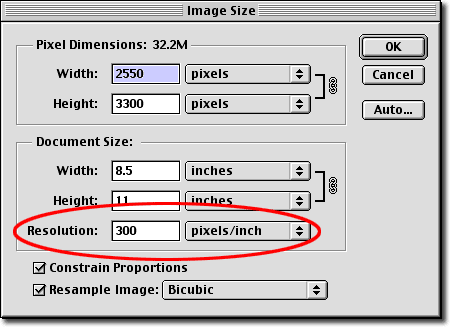
avoid scaling problems. Also, images should be 300 dpi resolution minimum
(but not over 400) or 1,200 dpi for b/w line art
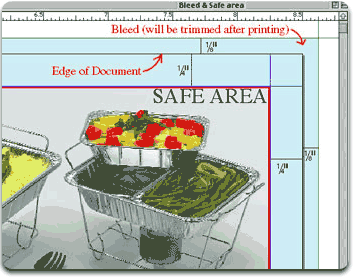
- Your document size should be 1/8" bigger than your final trim
size because when you use it in page layout software, it should extend
outside the page size if used as background
- Don't forget the safe area rule which will be in this case 1/4"
+ 1/8" for the bleed
2 Image Size
All images should be minimum 300 dpi resolution or 1,200 dpi resolution
for b/w line art.
SCALING IMAGES: Scaling the image after importing it into page layout
software will change the effective resolution, which means that if you
scaled the image up to 200% in Xpress, then the final resolution will
be 150 dpi which is low resolution.
3 Colors
All the files you submit to us should be in CMYK mode. If we receive any
RGB files, we'll convert them to CMYK mode and you'll be charged for the
service.
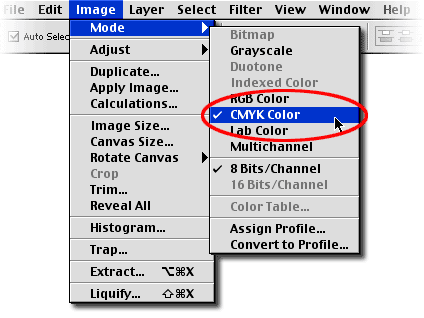
COLOR SHIFT: There is a color-shift when converting from RGB to CMYK.
Do not trust the colors on your monitor. We'll send you a calibrated color
proof before printing your job.
4 Fonts
When submitting a Photoshop TIFF or EPS image, all fonts become part of
the the photo. Make sure to double check all spelling and punctuation.
It's always a good idea to keep a layered copy of your file in your computer.
Just in case you catch a mistake after the proofs, it will be easier to
change and send back the TIFF or EPS.
5 Saving Your Files
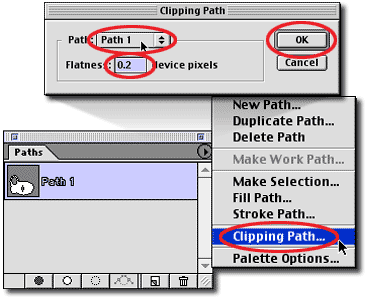
Photoshop EPS Clipping
Path
If you have a clipping path, save it with a 0.2 flatness
Send us only TIFF or EPS format without any kind of compression, (LZW,
JPG, etc.)
we don't accept JPG, GIF, BMP, PNG, etc. formats.
Remember: if we are missing anything, it may delay
your job.
CMYKnet Creative Services
ART DIRECTION • PHOTOGRAPHY
• GRAPHIC DESIGN • DIGITAL RETOUCHING • PRINTING
20 West 22nd Street, Suite 808, New York,
NY 10010
TEL: 212-463-8880 • 800-214-8812 • FAX: 212-463-8838
|